
New Stay-away nights, counted straight into gross pay

Timesheets that end in a pay figure.

Your crew log hours against jobs from a phone on site. The office gets the week already split into standard, overtime, Saturday, Sunday and bank holiday — priced by your own rules, and ready for payroll.

  • Nothing to install
  • Hosted in London
  • UK bank holidays built in
  • Built with a steel fabricator
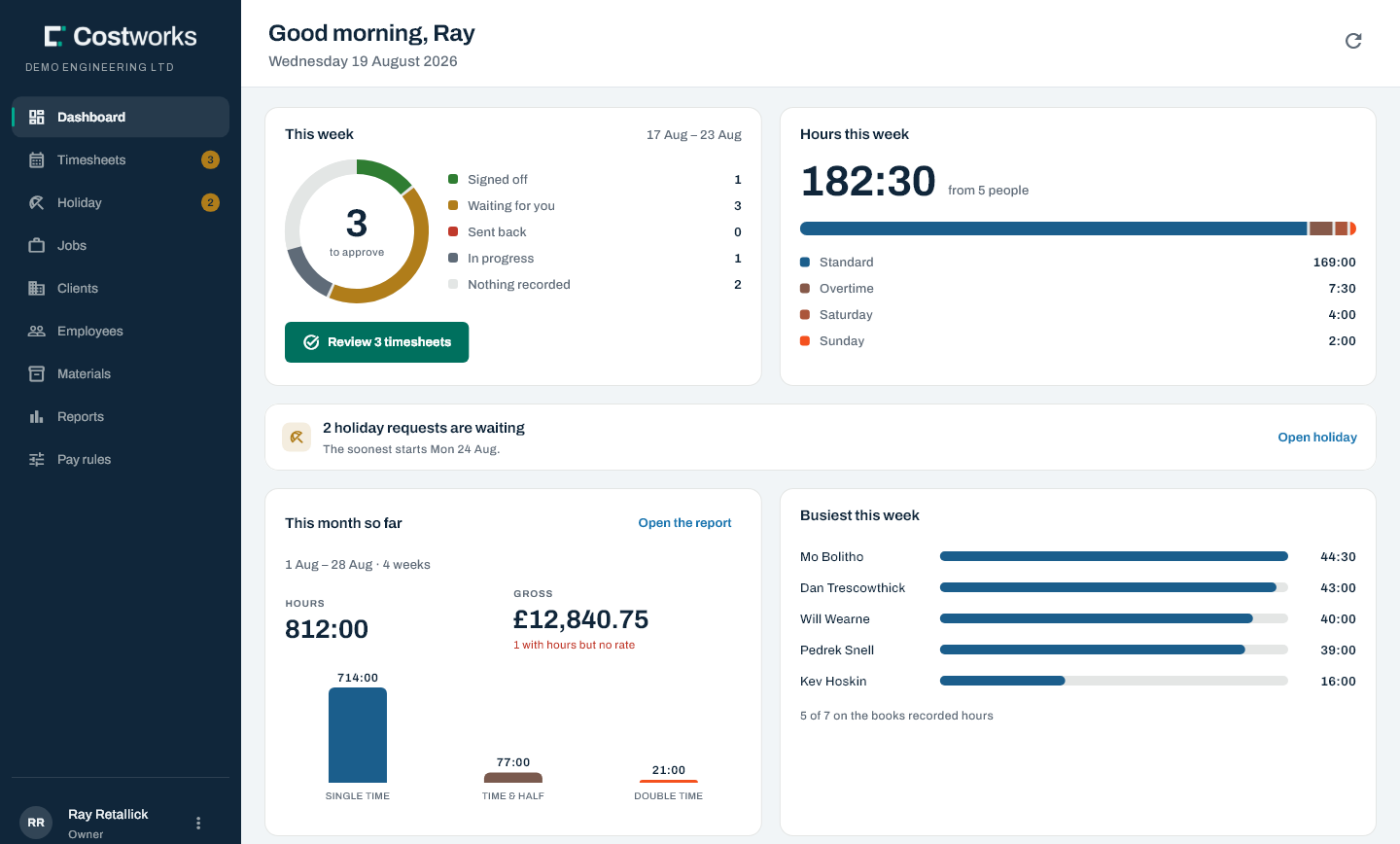
The Costworks office dashboard: three timesheets waiting to approve, 182 and a half hours logged this week across five people split into standard, overtime, Saturday and Sunday, two holiday requests waiting, the month so far at 812 hours and twelve thousand eight hundred pounds gross, and who has been busiest.
Half-hour shifts Night shifts over midnight Daily & weekly overtime Saturday-start weeks Sunday & bank holiday rates Stay-away nights Half-day holiday EN1090 weld records Materials per job Subcontractor hours Your own job numbers Dated pay rates Payroll CSV Job audit PDFs

Friday afternoon

The same Friday, two ways

A paper sheet is quick to fill in and slow everywhere after that. Costworks moves the adding-up to the moment the hours are entered, so the end of the week is a review rather than a reconstruction.

On paper

  1. 14:30Ring round for the sheets nobody has handed in
  2. 15:05Work out whether that says 7 or 1, and which job it was
  3. 15:40Add up the overtime by hand — twice, because the totals disagree
  4. 16:20Find out what the rate was before the pay rise
  5. Month endDiscover how many hours actually went on that job

With Costworks

  1. 14:30The dashboard already says who hasn’t sent their week
  2. 14:35Every week arrives typed, against a job, and banded
  3. 14:50Approve it, or send it back with a reason the crew can read
  4. 15:00Gross pay is priced at the rate in force on each day worked
  5. Any dayEvery job shows the hours booked to it, as they are booked

One system

Everything the week needs, and nothing it doesn’t

From the crew’s phone to the payroll spreadsheet, in one place, with one login per person.

On site · the crew

A day’s hours in a few taps, standing in a yard

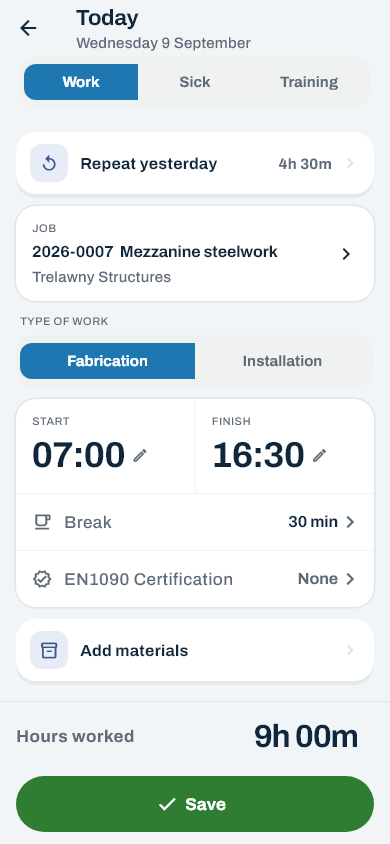
Pick the job, fabrication or installation, start and finish on half-hour wheels, save. Repeat yesterday is one tap; copy last week is two.

Job2026-0007  Mezzanine steelwork
WorkFabrication
Times07:00 → 16:30 · 30 min break
Hours worked9h 00m
Office · approvals

Approve, or send it back

Every person, every week, with its status. A reason goes with every send-back.

Will WearneApproved
Pedrek SnellWaiting
Kev HoskinSent back
Dan TrescowthickNot sent
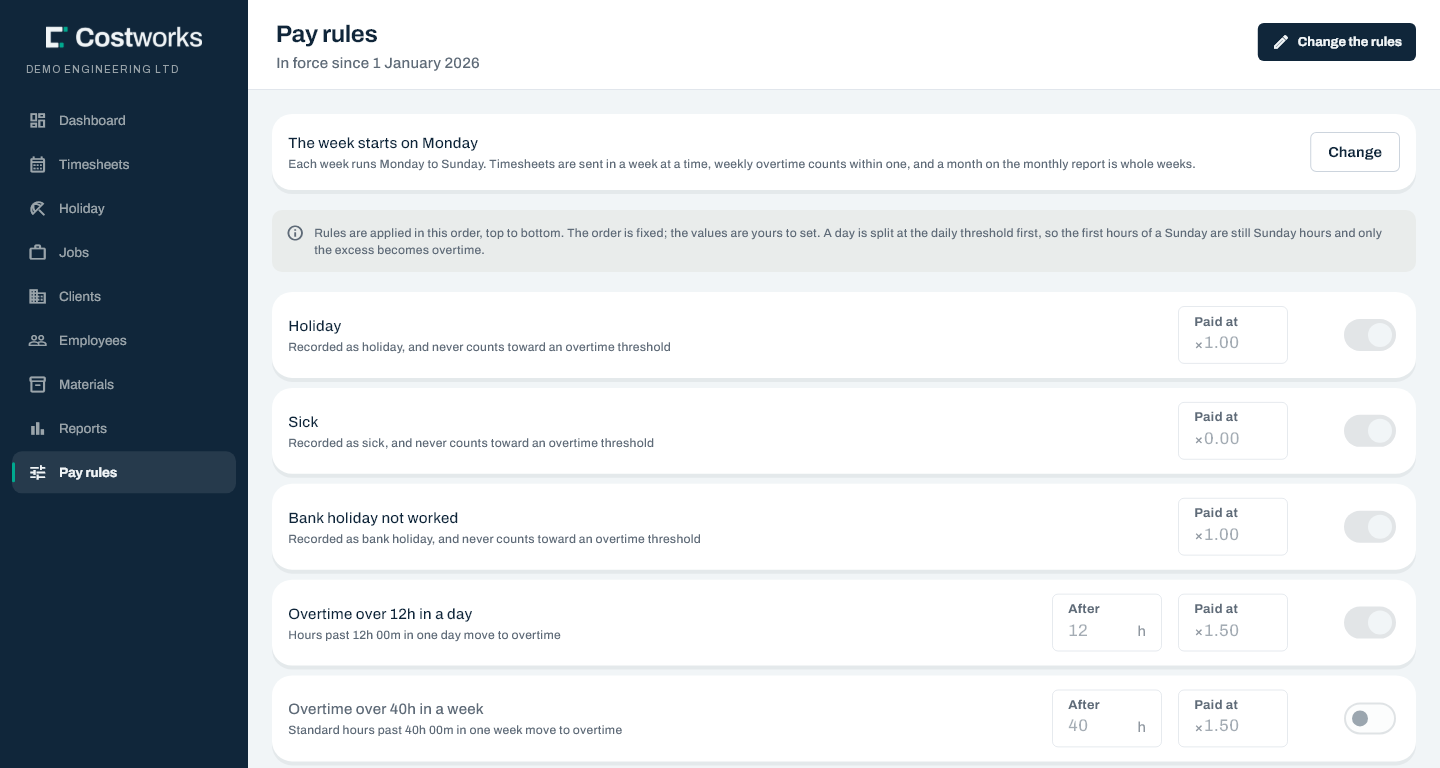
Pay rules

Banded once, by one engine

Your thresholds and multipliers, applied in a fixed, defensible order.

StandardOvertimeSaturdaySunday
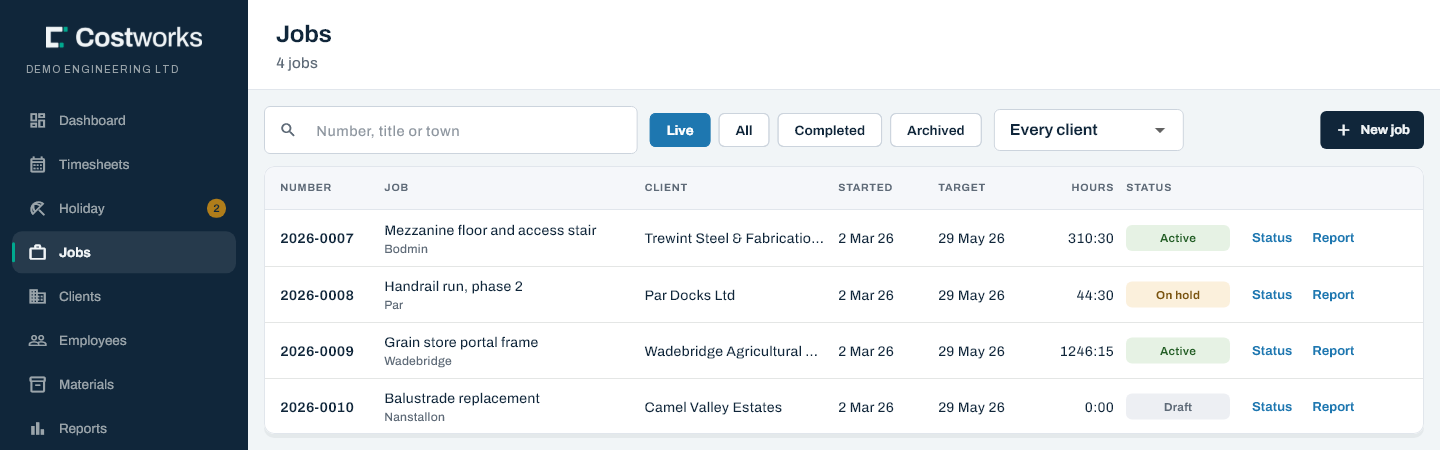
Jobs

Keep the numbers on your paper job sheets

Type the job number off the sheet, or let Costworks offer the next one.

26 1562026-0156
Holiday

Asked for, not just taken

Whole or half days, who else is off, and an approver you choose.

Payroll report · CSV

Hours and gross pay for the month, signed off

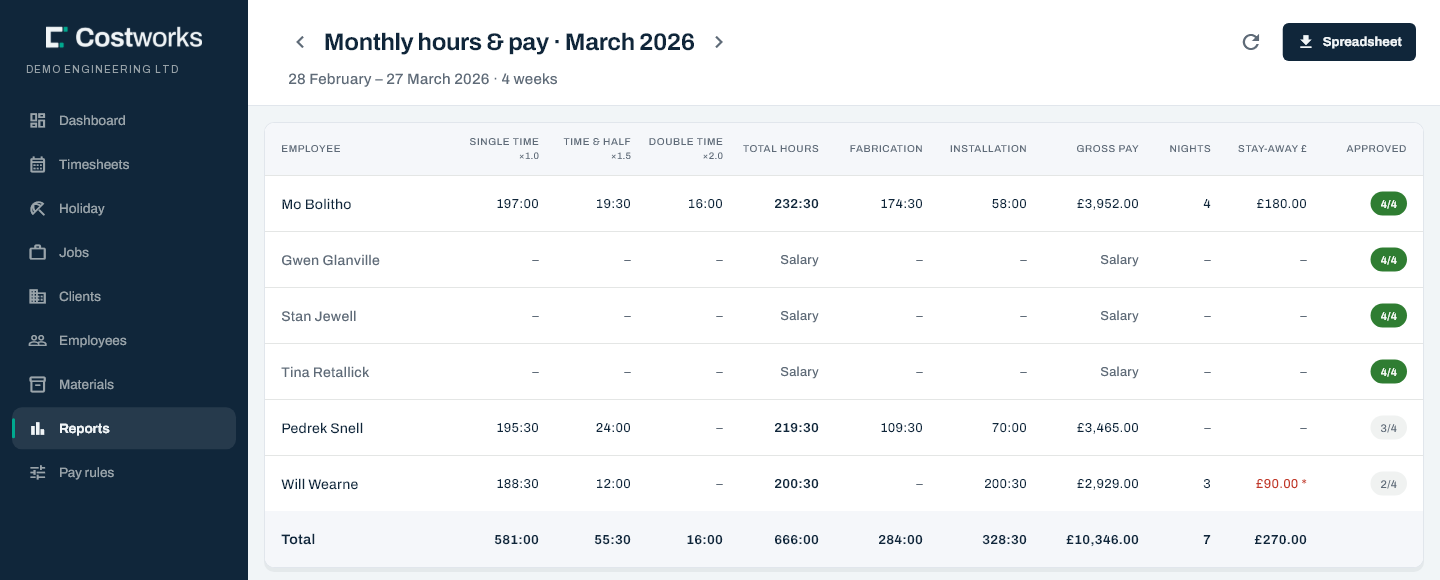
Single time, time and a half, double time, fabrication against installation, stay-away nights and gross — and how many of the month’s weeks are approved, so a total that can still move never looks final.

Mo Bolitho176:30 · £3,208.50
Will Wearne168:00 · £2,940.00
Weeks approved4 of 4
EN1090 · audit

A record of who welded what, and who checked it

Wire, gas and plant on the shift; signed off in the office, never by the welder. Every job prints an audit report with the people, the days, the records and the materials — and no pay in it.

Wire · Gas · PlantW-2231 · G-118 · 3
CheckedSigned off by the office

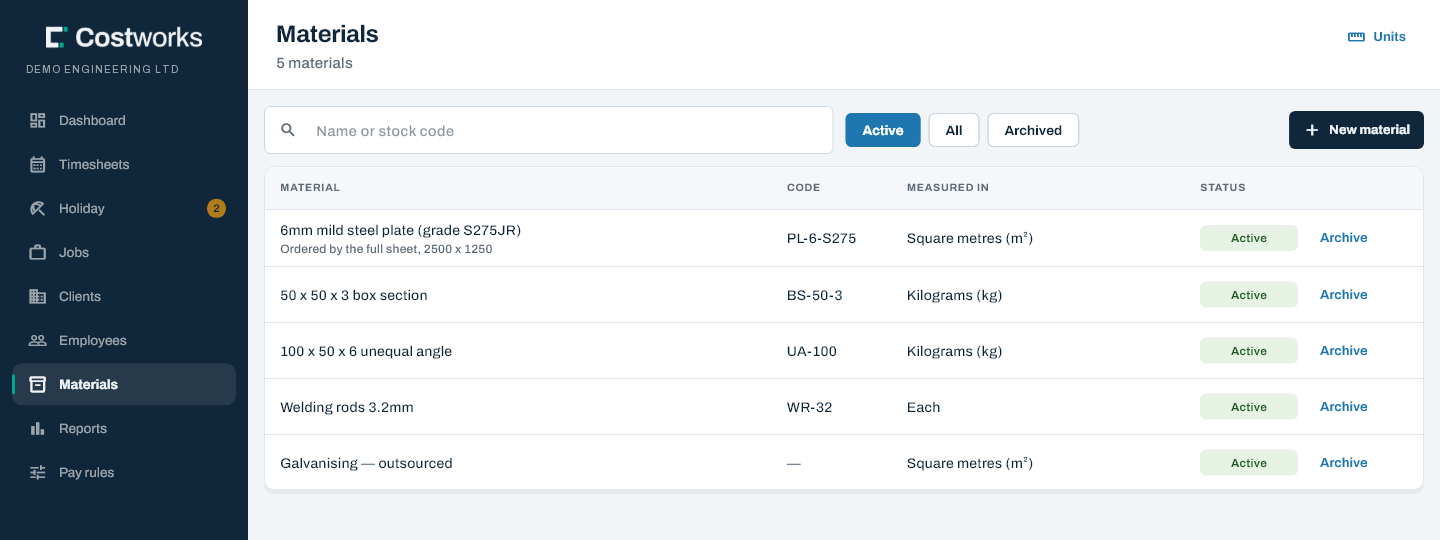
Materials, against the job

Your catalogue and units. The crew record quantities; the office can correct them.

Subcontractors, off the invoice

Their days count on the job and never anywhere near the payroll.

Your firm’s data, and only yours

Hosted in London. The crew see their own hours and never anybody’s pay.

How a week moves

From the yard to the payroll in five steps

Every week takes the same route, and every step leaves a record of who did it and when.

Daily

Hours go in on site

Against a job, on a phone, on the half hour.

End of week

The week is sent

One button. Hours, materials and nights lock together.

Office

Approved or sent back

Already banded and priced. Nobody approves their own.

Month end

Report and CSV

Hours and gross for every person, ready to hand over.

Your payroll

Paid as you pay now

Your bureau or software takes it from there.

Try it

Play with the pay engine

This is the same calculation Costworks runs on every timesheet, with the rules it ships with. Drag the hours about, switch rules on and off, and watch a week turn into a gross figure — and why.

The order the rules apply in

Leave is set aside first. Each day’s hours are split at your daily threshold; what is left is banded by the kind of day — bank holiday, Sunday, Saturday or standard; then the weekly threshold is applied to standard hours; and finally every band is priced at the rate in force on the day it was worked. Turn on JavaScript to try it with your own numbers.

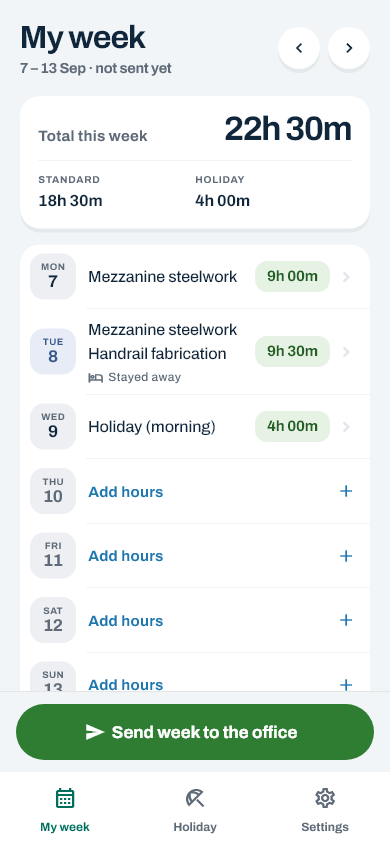
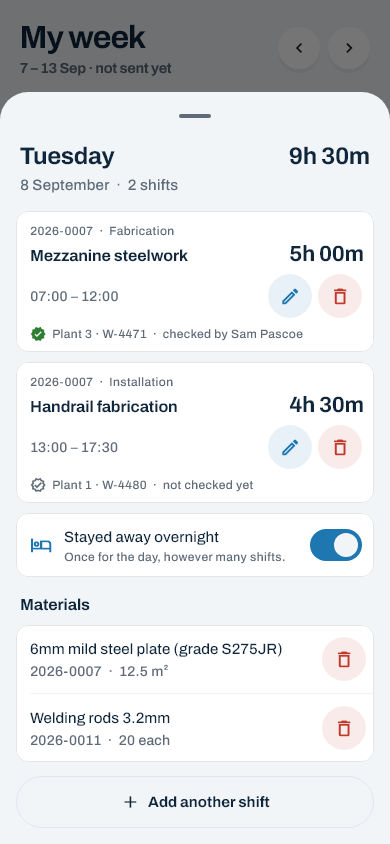
The day editor on a phone: work, sick or training; Repeat yesterday; the job 2026-0007 Mezzanine steelwork; fabrication or installation; start 07:00 and finish 16:30; a thirty-minute break; the EN1090 certification; Add materials; and nine hours worked above a green Save button. My week on a phone: the week's total split into standard and holiday, each day listed with its jobs and hours, a night away marked on Tuesday, a holiday morning on Wednesday, and a Send week to the office button. The day sheet on a phone: two shifts on one day, each with its job, type of work, times and EN1090 record; a Stayed away overnight switch; the day's materials; and Add another shift.

On site

Built for a phone in a gloved hand

It runs in the phone’s own browser, so there is nothing to install and nothing to update. Add it to the home screen and it opens like an app.

  • Copy last week. Most weeks on most sites are the week before with two days different.
  • Night shifts and clock changes look after themselves. A shift past midnight is one shift, and the two nights a year the clocks move come out right.
  • No money on the crew’s screens. They see their hours and their bands, never a rate or a gross.
More on the crew’s app

In the office

The real application, not a drawing of one

Every screen below is the app itself, rendered from its own test suite. Approve the week, check the month, and see what every job has cost in hours.

The dashboard: a ring of where every timesheet has got to, hours this week split by band, holiday requests waiting, the month so far with gross pay and a flag on anybody with hours but no rate, and who has been busiest.

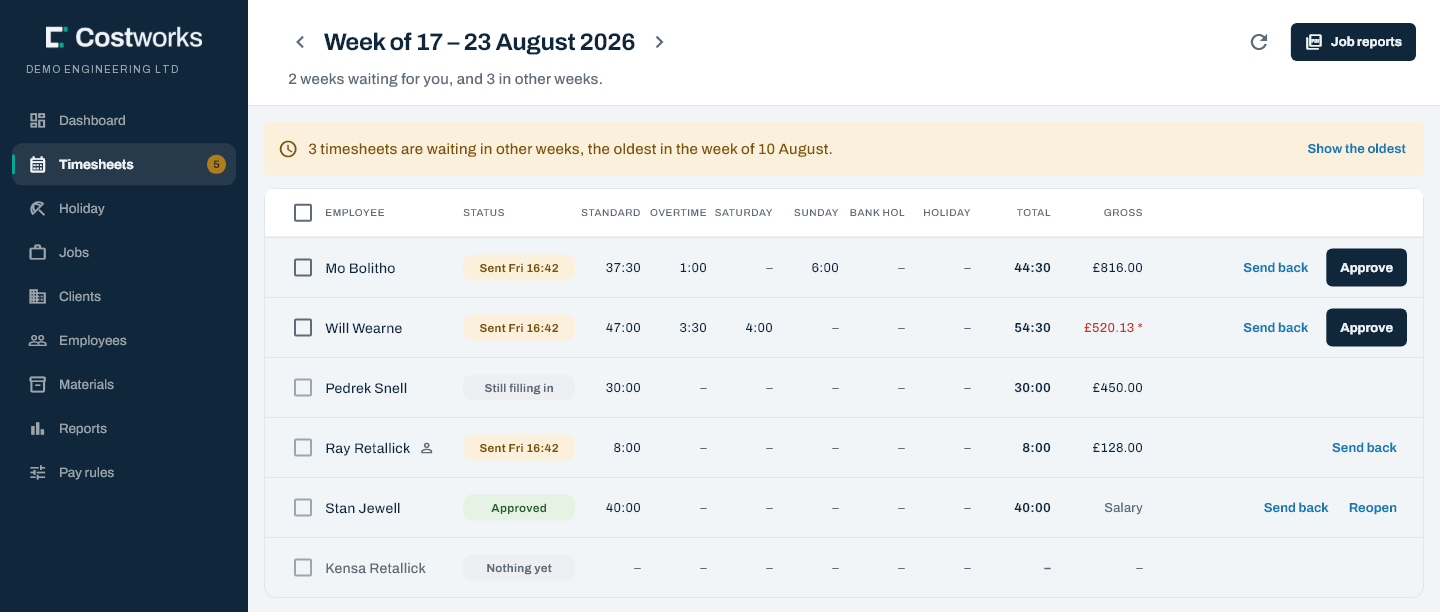
Friday, in one screen. Who is signed off, who is waiting on you, who has recorded nothing — and a flag against anybody with hours logged and no rate set, because that is the one that quietly makes a payroll figure wrong.

Built in a real workshop

Shaped by a working steel fabricator, week after week

Costworks runs the week at Coast 2 Coast Engineering, structural steel fabricators in Bodmin. A lot of what it does came straight from their office.

  • Weeks that start on a Saturday, because that is how their payroll runs.
  • Their own job numbers, typed off the paper register, so nothing on the shop floor had to change.
  • Stay-away nights paid at a set amount and counted into gross pay.
  • Subcontractors’ invoiced hours on the job, and nowhere near the payroll.

Trust

Payroll numbers you can stand behind

A rounding rule that is quietly wrong never announces itself. So the pay engine is tested against worked examples, every firm’s data is walled off from every other’s, and nothing is ever thrown away.

4,143

automated checks on the pay engine, the API, the app and the walls between firms — all passing on 15 October 2026.

London

Hosted on Amazon Web Services in eu-west-2, with every connection encrypted.

210,000

rounds of PBKDF2 protecting every password, with sign-in lockouts and rate limits in front.

0

records ever hard-deleted. People, jobs and clients archive; a removed shift is marked, not erased.

The crew see only their own

Who you are comes from your sign-in, so nobody can look at a colleague’s hours. Nobody on the crew ever sees a rate or a gross.

Every decision written down

Approvals, send-backs, reopenings and rate changes are recorded in a log that can be added to and never edited.

Leavers are out on the day

Archiving somebody suspends their sign-in at once, so a leaver cannot still send a week in.

How Costworks looks after your data

Straight answers

What it deliberately doesn’t do

Three limits worth knowing before you ask, rather than after. Each is a decision, not a gap waiting to be filled.

It isn’t a payroll bureau

Costworks produces hours and gross pay and hands them to whoever runs your payroll. PAYE, National Insurance, pensions and payslips stay where they are.

It needs a signal

Hours save against a live connection, on purpose: two copies of a payroll record that can disagree are worse than walking to the gate to send the week.

It exports, it doesn’t integrate

No plug-ins and nothing to connect. Hours and pay come out as a spreadsheet for whatever your accountant already uses.

Questions

Asked before anybody signs up

Do the crew need to install anything?

No. Costworks runs in the phone’s own browser at app.costworks.co.uk, on iPhone and Android. Add it to the home screen once and it opens like any other app.

Can we set our own overtime rules?

Yes. You set the daily and weekly overtime thresholds, the multipliers for overtime, Saturday, Sunday and bank holidays, and switch each rule on or off. A change starts from a week you choose, and a week already approved is never re-priced.

Our week runs Saturday to Friday. Is that a problem?

Not at all. The day your week starts is a company setting, and the payroll month is the whole weeks ending in it.

Does Costworks do our payroll?

No, and it isn’t meant to. It produces hours and gross pay for every person and exports them as a spreadsheet for your payroll bureau or software.

How do we get started?

Get in touch. We talk through how your week works, send you an access code, and you set the company up in three short steps. Then you invite the crew by email.

All the questions and answers

Retire the paper timesheet before next month’s payroll

Tell us how your week works. You’ll get a straight answer on whether Costworks fits — and if it does, we’ll help you set it up.