
- Home
- Features
Features
From the crew’s phone to the payroll spreadsheet
One web app for the whole week: hours recorded against jobs on site, approved in the office already banded and priced, and handed to payroll as a report and a CSV. Here is all of it.
At a glance
Seven parts, one system
Each part has a page of its own. They share one sign-in per person, one list of jobs and one set of pay rules, so nothing is ever typed twice.
The crew’s timesheet app
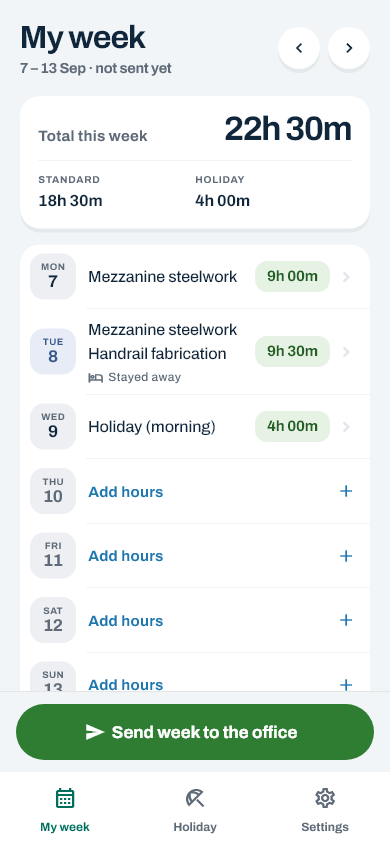
A day’s hours against a job in a few taps, on any phone. Repeat yesterday, copy last week, two jobs in a day, night shifts, materials and stay-away nights.
The timesheet app Office · weeklyApproving the week
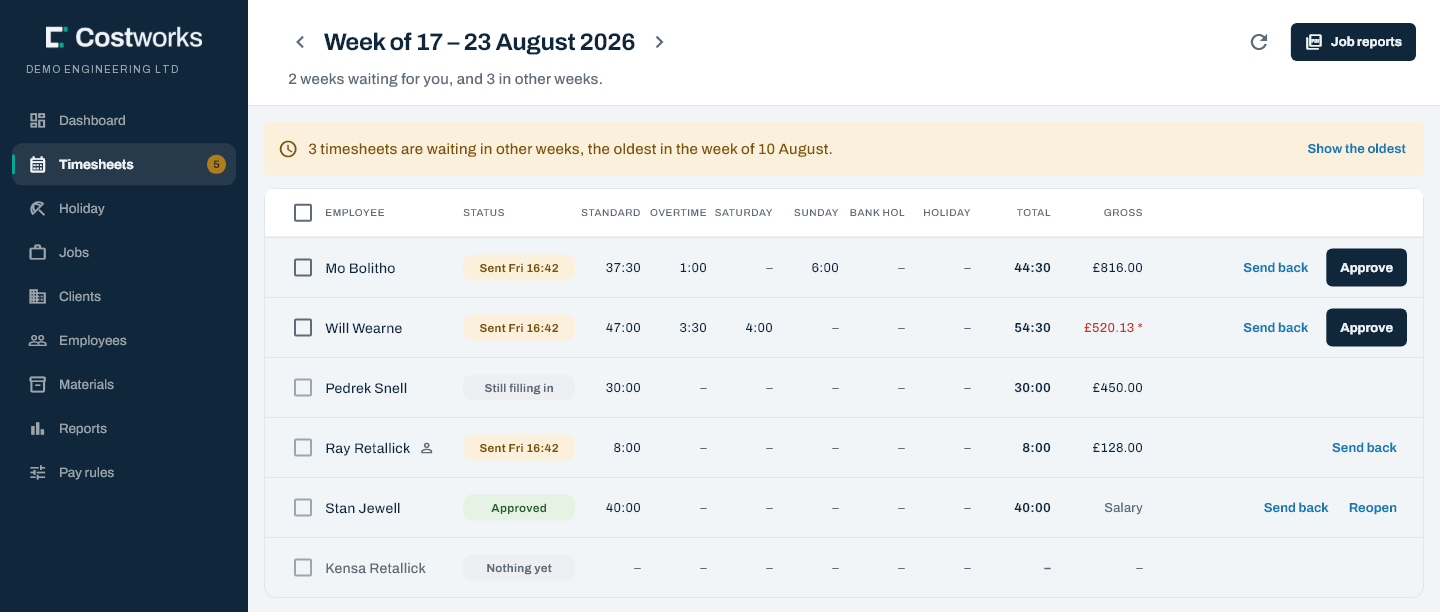
Every person on one board, their hours split into bands that add up to the total, with gross pay beside. Approve, send back with a reason, or reopen.
Approving the week PayOvertime & pay rules
Your thresholds and multipliers, dated pay rates, and a calculation you can try for yourself.
Pay rules Month endPayroll report & CSV
Hours and gross for every person in the payroll month, and a spreadsheet that opens cleanly in Excel.
The payroll report Jobs · shop floorJobs, materials & EN1090
Hours booked to every job, your own job numbers, materials, weld records and a printable audit report.
Job tracking HolidayHoliday booking
The crew ask for whole or half days and see who else is off. Only the people you choose approve, and the balance is counted from what is actually booked.
Holiday booking TrustSecurity & your data
Hosted in London, walled off from every other firm, and nothing ever hard-deleted. The crew see their own hours and never anybody’s pay.
SecurityOn site · the crew
Hours in a few taps, against the right job
It runs in the phone’s own browser, so there is nothing to install. Add it to the home screen and it opens like an app.
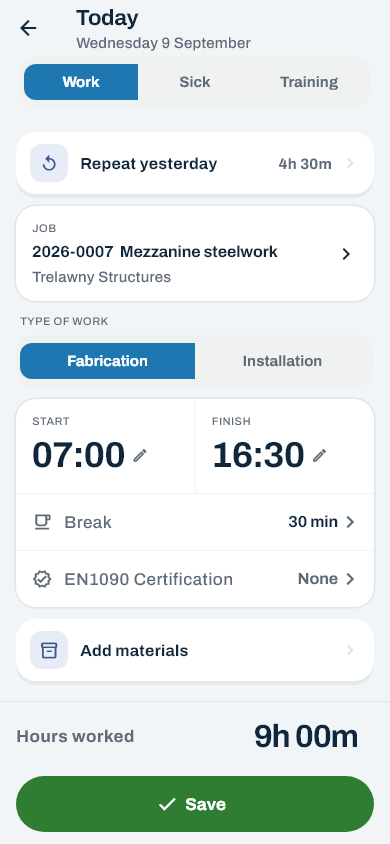
- The day editor. Work, sick or training; the job, searched by number, name or client; fabrication or installation; start and finish on half-hour wheels; a break in 30-minute steps.
- Repeat yesterday and copy last week. One tap fills a day the same as the day before; two bring the whole of last week forward.
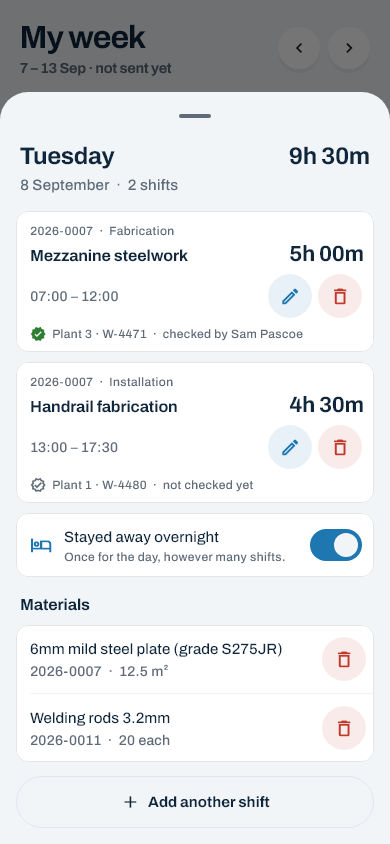
- Two jobs in a day, and night shifts. Each job is its own shift. Shifts that cross are refused, and a shift past midnight is worked out for you.
- Materials and nights away. Quantities against the job from your catalogue, and one tick for a night away.
- Send the week. One button, and the week locks until the office approves it or sends it back.
In the office
The week arrives already added up
The bands are worked out before anybody in the office looks. Approving is a review, not a sum.
The dashboard
Where every timesheet has got to, the week’s hours by band, the month so far, and who has recorded nothing yet.
Send back, with a reason
The reason goes to the person, and their days open again. Reopening an approved week needs a reason too, and is recorded.
Nobody approves their own
An office user’s own week goes to somebody else. The server refuses it, not just the screen.
Pay
Your rules, priced at the rate for the day
Thresholds and multipliers are yours to set. The order they apply in is fixed, because that order is what makes the answer defensible.
Overtime, weekends and bank holidays
Daily and weekly overtime thresholds, Saturday, Sunday and bank holiday multipliers, each switched on or off. Changes start from a week you choose, and an approved week is never re-priced.
Hours and gross for the payroll month
Every person’s hours by multiplier, fabrication against installation, stay-away nights and gross pay, with how many of the month’s weeks are approved.
Jobs & the shop floor
What every job took, in hours and materials
Every shift is booked to a job, so the hours on a job are counted as they go in — not reconstructed from paper at the end of the month.
Your job numbers
Offered automatically, or typed off the paper job sheet. 26 156 finds 2026-0156.
Materials
Your catalogue and units, with quantities recorded against the job by the crew.
EN1090 records
Wire, gas and plant on the shift, signed off in the office, and a printable job audit report.
Subcontractors
Days off each invoice, counted on the job and never anywhere near the payroll.
Asked for, not just taken
Whole or half days, skipping weekends and bank holidays. The person asking sees who else is off; only an approver an owner has chosen can say yes, and never to their own. The balance is counted from what is booked, so it cannot drift.
Your firm’s data, and only yours
Hosted on Amazon Web Services in London. Every query is fenced to your company, and a test suite of its own tries to reach one firm’s data from another’s account. Nothing is hard-deleted, and every approval is written down.
- The crew see only their own hours, and never a rate or a gross
- Archiving a leaver suspends their sign-in at once
And the rest of it
The details that make it a whole system
Employees, hourly or salaried
Dated pay rates, contracted hours, holiday entitlement per year, and a sign-in that ends the moment somebody is archived.
Clients
The firms you work for, their contacts and their jobs. A client with live jobs cannot be archived by mistake.
Invitations by email
Each person chooses their own password from a link. No email? A one-time password works too.
Owners, admins and crew
Admins run the office side; owners also decide who else is an admin and who approves holiday.
Any week start
Weeks can start on whichever day your payroll runs from, Saturday included.
Office screens on a tablet
The office side works on a tablet or a phone too: tables drop columns and then become cards.

See it with your own week in it
Tell us how your week runs — the sheet, the job numbers, the Sunday rate — and we will show you what it looks like in Costworks.