
Jobs, materials & EN1090
What every job took, as it was booked
Every shift is recorded against a job, so the hours on a job are counted as they go in — with the materials, the weld records and the people beside them, and a report that prints the lot.
Job numbers
Keep the numbers on your paper job sheets
Nothing on the shop floor has to change. Costworks reads job numbers the way your crew already write them.
Numbered, never twice
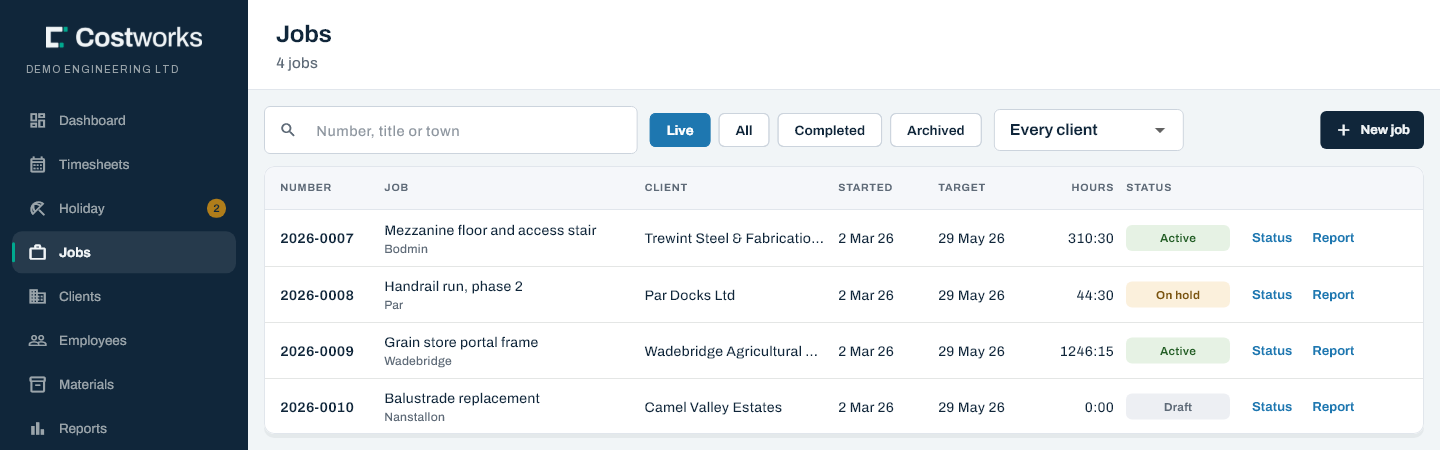
Numbers are the year and a sequence: 2026-0007. Costworks offers the next one, and two people creating jobs at the same moment never get the same number. Every year starts again at 0000, with nobody needed on 1 January.
Or type the one you already have
Type the number off the paper job sheet. It must be unique, and the counter moves past it so the next number carries on from the highest. 26 156 — the way it is written on the sheet — finds 2026-0156 in every search.
Word jobs
2026-ADMIN and 2026-YARD hold the hours that belong to no customer job. They never use up a number.
A status for every stage
Draft, Active, On hold, Completed — which refuses new hours — and Archived.
Hours on every job
The jobs list shows the labour hours booked to each job, subcontractors’ included, as they go in.
Clients, alongside their jobs
Name, contact, phone, email, address and notes. Clients archive rather than disappear, and one with live jobs cannot be archived by mistake.
Renumbered on the record
If a job’s number has to change, the change is written into its history, so the paper trail and the system never disagree about what a job was called.
EN1090 records · the audit report
Who welded what, and who checked it
Weld traceability goes on the shift it belongs to, and the job’s audit report prints it with everything else an auditor asks about.
- On the shift. Wire number, gas number — offered from the last one used — and plant, recorded by the welder with the hours.
- Signed off in the office. Mark checked records who checked it. Nobody can sign off their own.
- The job audit report. A PDF of who worked on the job and on which days, the EN1090 records and who checked them, the materials, how far each week got through the office, and the job’s record history.
- Headed with your company’s details — address, company number, VAT number and EN 1090 certificate — and with no pay in it, so it can go to an auditor as it is.
A record, not a certificate. No software makes a workshop EN 1090 compliant. Costworks keeps the traceability your factory production control asks for, in one place, signed off and printable.
Materials
What went on the job, as well as who
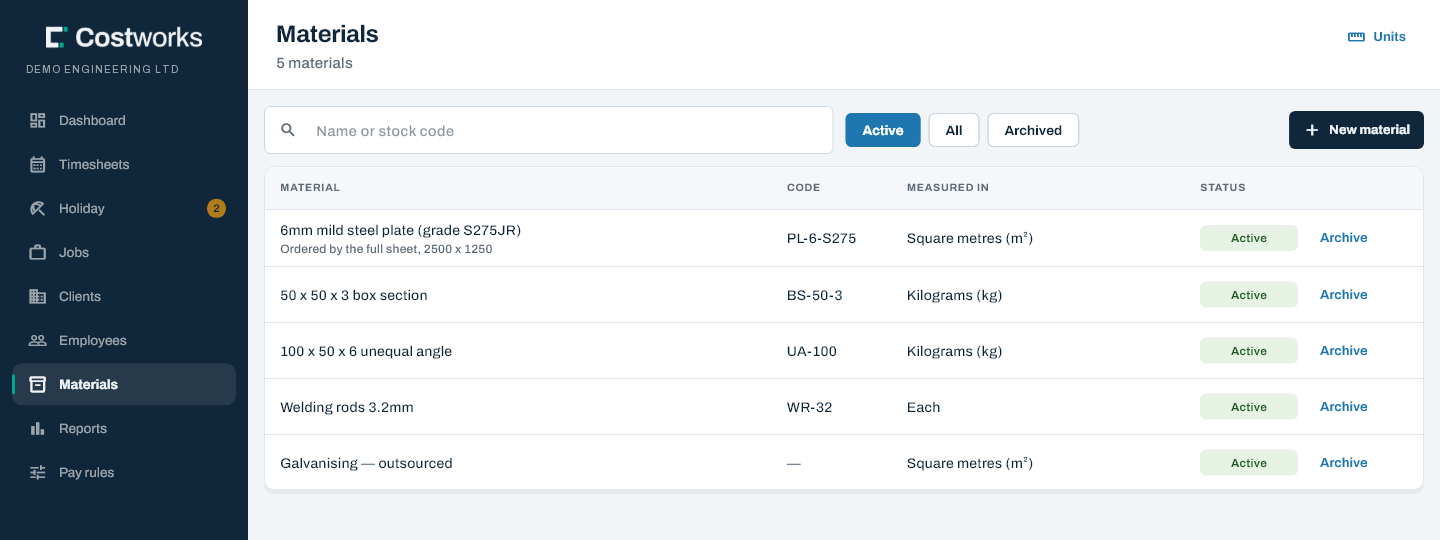
The office keeps the catalogue and its units; the crew record quantities against the job from the same screen as their hours.
Units that stay put
A material’s unit is fixed once anything is recorded against it, so square metres can never quietly become kilogrammes.
Recorded on site
The crew pick a material and type a quantity. They can remove one until the week is sent; then it locks with the hours.
Every entry, per job
Totals per job with the number of entries, and “See each entry” to find the one that was keyed twice.
Corrected by the office
The office can remove an entry or add one for somebody, in any week. Each is recorded, and shown as “added by the office”.
Quantities only: Costworks does not price materials or keep stock levels.
Subcontractors
On the job, and nowhere near the payroll
Subcontractors invoice for their time, so they fill in no timesheet and are never on the payroll. Their hours still belong on the job.
- Entered off the invoice. On the subcontractor’s Hours tab: the day, the hours (7.5 or 7:30), the job, fabrication or installation, and the invoice number.
- Counted on the job. In the jobs list’s hours and in the job audit report, marked as hours from invoices.
- Kept away from pay. Never on the Timesheets board, the monthly report or the CSV — by design, in a record of their own.
- No sign-in. A subcontractor cannot be given one, or an invitation.
Questions
About jobs and materials
Can we keep the job numbers we already use?
Yes. Type the number off the paper job sheet, or let Costworks offer the next one. A typed number must be unique, and the counter carries on from the highest. Numbers are year then sequence, like 2026-0156, and 26 156 finds that job in any search.
Where do admin and yard hours go?
On word jobs such as 2026-ADMIN and 2026-YARD. They hold hours that belong to no customer job, never use up a job number, and sit at the top of the year’s list.
Does Costworks make us EN1090 compliant?
No software can do that. Costworks records the traceability your factory production control asks for: wire, gas and plant on each shift, who checked it in the office, and a job audit report that prints all of it.
Does it show profit or margin on a job?
No. It shows the hours booked to every job, the materials recorded against it and who worked on it. It does not price materials or report margins.
Do subcontractors need a sign-in?
No, and they cannot have one. The office enters their days off each invoice, against the job. Those hours count on the job and its audit report, and never on the payroll.
Other features
The same hours, seen another way

Know what the job took before the invoice goes out
Bring us your job register and your paper job sheet, and we will show you your jobs in Costworks.