1. Home
  2. Features
  3. Timesheet app

The crew’s timesheet app

A day’s hours in a few taps, standing in a yard

Pick the job, fabrication or installation, start and finish, save. It runs in the phone’s own browser, so there is nothing to install and nothing to update — and if today looks like yesterday, that is one tap.

  • iPhone and Android
  • Half-hour wheels
  • No money on screen
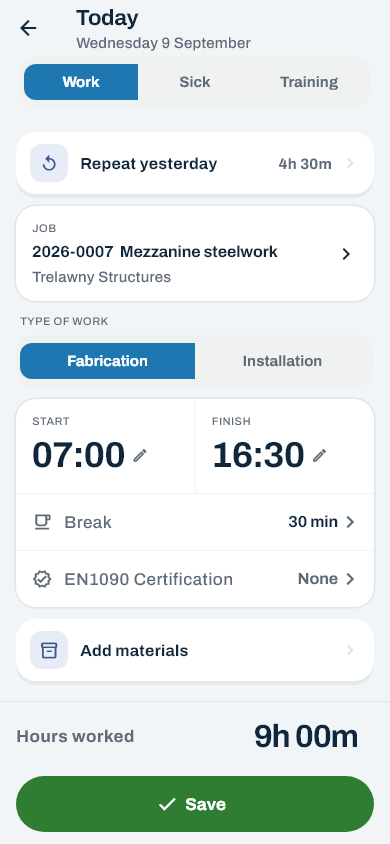
The day editor, headed Today: work, sick or training; Repeat yesterday; the job 2026-0007 Mezzanine steelwork for Trelawny Structures; fabrication or installation; start 07:00 and finish 16:30; a thirty-minute break; the EN1090 certification; Add materials; and nine hours worked above a green Save button.
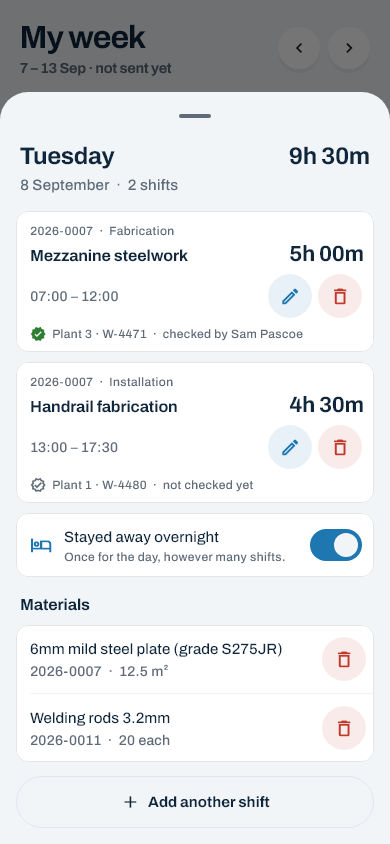
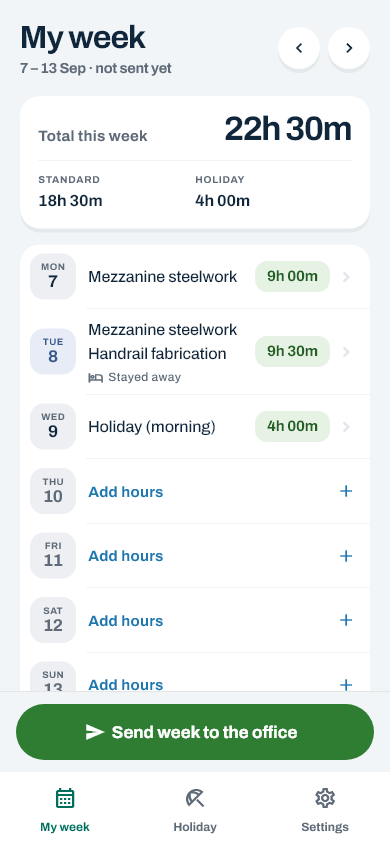
The day editor: the job, the type of work, start and finish, the break, the EN1090 record, materials, and the hours worked before Save. The day sheet: two shifts on one day, each with its job, type of work, times, hours and EN1090 record, a pencil to change it and a bin to remove it; a Stayed away overnight switch; the day's materials; and Add another shift. My week: twenty-two and a half hours this week split into standard and holiday, each day with its jobs and hours, a night away on Tuesday, a holiday morning on Wednesday, and Send week to the office.

Three screens

Everything a day needs, and the week on one page

The crew have three tabs — My week, Holiday and Settings — and the day editor. That is the whole app.

Quicker than the paper sheet

Most weeks are last week with two days different

So the app starts from what the crew did before, rather than from a blank page.

Repeat yesterday

One tap fills the day with yesterday’s job, type of work, times and break. Change what is different, then save.

Repeat yesterday4h 30m

Copy last week

Brings the whole of the previous week forward while this one is still empty. Copied shifts land on the half hour, at the same clock time even across a clock change, and it says which still need a type of work.

Find the job the way you say it

Search by number, title or client. The paper habit of writing 26 156 finds job 2026-0156.

26 1562026-0156

Right first time

The awkward days look after themselves

The cases that make a paper total wrong are handled where the hours go in, so the office never has to catch them.

No hour paid twice

Two shifts that cross are refused, so one hour can never be on two jobs. A handover on the hour is fine: one shift can finish at the time the next one starts.

Night shifts and clock changes

A shift that finishes after midnight is one shift, worked out for you. The two nights a year the clocks move come out right, because durations are worked out from the real clock, not from the numbers on the wheels.

On the half hour

Times go in on half-hour wheels and breaks in 30-minute steps — the way the paper sheet was already filled in, without anybody rounding by eye.

The days that were forgotten

Hours can go in for up to eight weeks back and two weeks ahead, as long as that week has not been sent yet.

On the same shift

Materials, nights away and weld records, where the hours are

The extras a fabrication week carries go in on the same screens as the hours, so nothing is kept on a separate sheet.

  • Materials against the job. Pick from the office’s catalogue and type a quantity; the unit comes with the material. A day’s materials are listed on its day sheet, with a bin while the week is still theirs. How to record materials
  • Stayed away overnight. One tick per day, however many shifts there were. The office sets the amount a night is paid. Stay-away nights
  • EN1090 records on a shift. Wire number, gas number — offered from the last one used — and plant, for the office to sign off.
Tue 13 Oct · day sheet
2026-0007 Mezzanine steelwork07:00–12:00
2026-0012 Stair and balustrade12:00–16:30
Materials2 m · 50×50 angle
EN1090W-2231 · G-118 · plant 3
Stayed away overnightYes
Hours worked9h 00m

The end of the week

Send it in, and know where it has got to

Every week has one of four states, shown on the crew’s own screen. Hours, materials and nights all lock together once the week is sent.

Not sent yet

Still theirs

Anything can be added, changed or removed.

Sent

With the office

Locked while the office looks at it.

Sent back

With a reason

The office’s reason is shown, and the days open again.

Approved

Done

Locked for good, unless the office reopens it with a reason.

Sending your week, step by step

Getting in

Signed in once, and then left alone

The crew sign in with an email and a password they chose themselves. On their own phone they need never do it again.

An invitation by email

The office sends a link; the crew member chooses a password and is signed straight in. The link works once and lasts seven days. First sign-in

Or a one-time password

For anybody without an email address. It has to be changed the first time it is used.

Keep me signed in

On their own phone, the session lasts ninety days from the last time it was used — so somebody who opens it every week never signs in again. On a shared workshop phone, Sign out is in Settings.

On the home screen

Add app.costworks.co.uk to the home screen once, and it opens like any other app, on iPhone or Android.

Forgotten password

A reset link by email, valid for thirty minutes and good once. Using it signs them out everywhere else. Forgotten password

Holiday, on the same phone

The Holiday tab shows days left and booked, and asks for more. Holiday booking

Questions

About the crew’s app

Do the crew need to download an app?

No. Costworks runs in the phone’s own browser at app.costworks.co.uk, on iPhone and Android. Adding it to the home screen gives it an icon and it opens like an app.

What happens with no signal on site?

A save needs a connection, on purpose, so there is only ever one copy of a timesheet. If a save fails, the hours stay on the screen; tap Save again once there is signal.

Can somebody record hours for a day they forgot?

Yes. Hours can go in for any day up to eight weeks back and two weeks ahead, as long as that week has not already been sent to the office.

Can the crew see each other’s hours or pay?

No. Each person sees only their own hours, and nobody on the crew ever sees a rate or a gross figure. The one thing shared is who else is off when somebody asks for holiday: names and dates only.

What about crew with no email address?

The office can give them a one-time password instead of an emailed invitation. They choose their own password the first time they sign in.

Recording a day, in the help centre

Put the paper sheet in the drawer

Invite the crew by email, and their first week goes in from their own phones.