
Getting started
From first call to the crew’s first week
There is nothing to download and no app store to search. Costworks runs in the browser — the office on a computer, the crew on their phones — so getting going is a conversation, a code, and an afternoon.
Six steps
How a firm gets going
Two of these are ours, and four are yours. None of them needs anybody to install anything, and the last four can be done in a single sitting.
Talk to us
Tell us how your week works: the paper sheet, the job numbers, the overtime and the nights away. You get a straight answer on whether Costworks fits.
We send you an access code
Ten letters and numbers, just for your firm. It works once and lasts fourteen days, and it comes with a link that fills it in for you.
Set up your company
Three short steps in the app: the code, your company and your week start day, then your email and a password. You are the owner, and you are signed in.
Jobs, people and rates
Check the pay rules — the defaults are a starting point, not a policy — then add your clients, jobs, people and their rates. We can bring an existing job register across for you.
Invite the crew
Each person gets an email with a link to choose their own password; it works once and lasts seven days. Anybody without an email address gets a one-time password instead.
On the home screen
The crew open app.costworks.co.uk on their phones and add it to the home screen. From then on it opens like any other app, and stays signed in.
Already have a code?
Set up your company now
Type the access code we sent you and we will take you straight to step one of the set-up, with the code filled in.
No code yet? Talk to us and we will send you one. Already set up? Sign in.
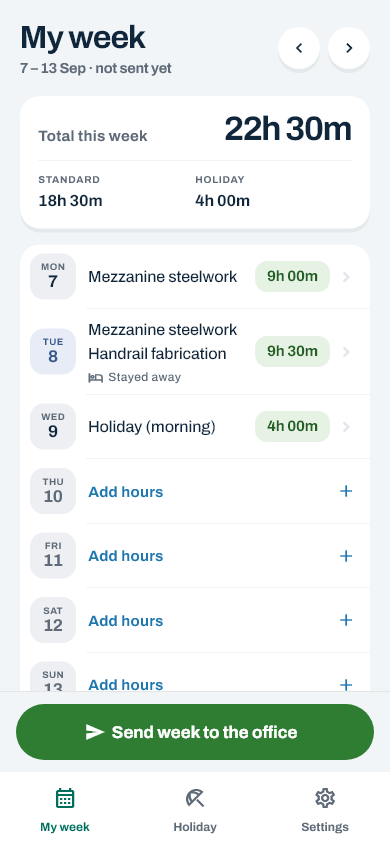
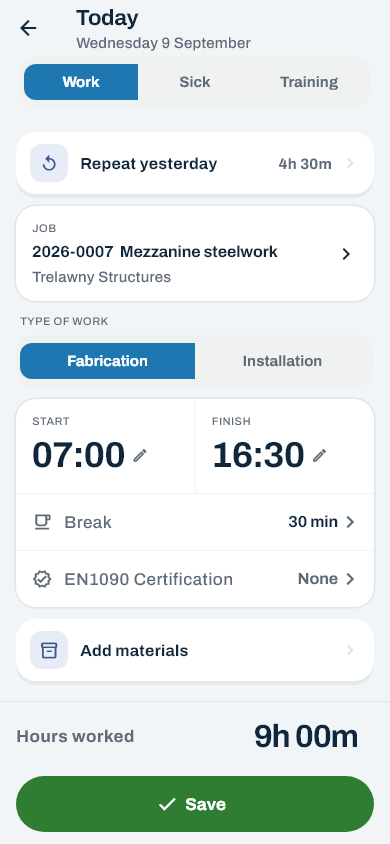
For the crew
No download — just add it to the home screen
Costworks runs in the phone’s own browser, on iPhone and Android alike. Add it to the home screen once and it opens with its own icon, like any other app.
- Open Safari and go to app.costworks.co.uk.
- Tap the Share button — the square with an arrow pointing up.
- Scroll down and tap Add to Home Screen.
- Tap Add. Costworks is now on your home screen.
- Open Chrome and go to app.costworks.co.uk.
- Tap the ⋮ menu in the top right-hand corner.
- Tap Add to Home screen — on some phones it says Install app.
- Tap Add or Install. Costworks is now on your home screen.
Tick “Keep me signed in on this device” on your own phone. Open Costworks at least once every few weeks and you will not be asked for your password again. On a shared phone, leave it unticked.
Before you start
What you will want to hand
None of it has to be perfect on day one, and everything can be added or changed later.
- The jobs you are working on, with their numbers if you already have them — or your whole job register, and we can bring it across.
- Your clients, the firms those jobs are for.
- Everybody who logs hours, with an email address where they have one.
- Each person’s hourly rate and the date it started, or that they are salaried.
- Your overtime rules: after how many hours in a day or a week, and what Saturday, Sunday and bank holidays pay.
- The day your payroll week starts, and each person’s holiday entitlement for the year.
- The materials you want recorded against jobs, and the unit each is measured in.
- A stay-away amount for nights away from home, if you pay one.

Start with a conversation
Tell us how your week works, and we will tell you honestly whether Costworks fits it.