
Payroll report & CSV
Hours and gross pay for the month, ready to hand over
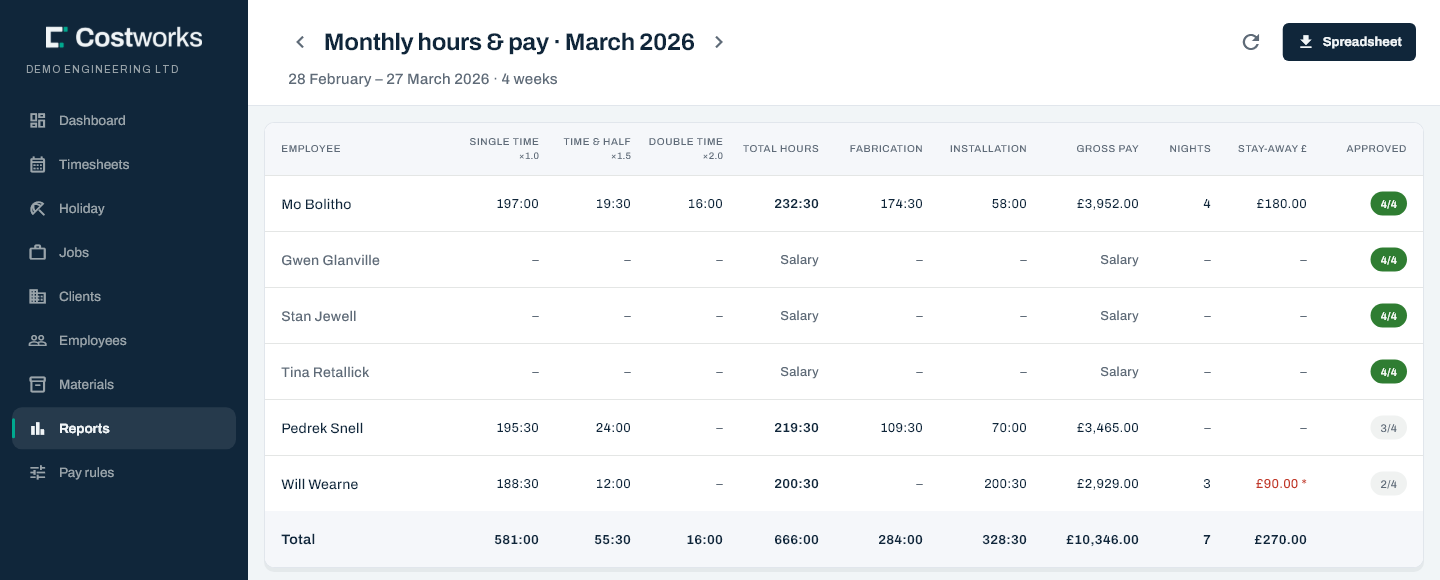
One row per person: single time, time and a half and double time, fabrication against installation, nights away and gross. It says how many of the month’s weeks are approved, and it downloads as a spreadsheet for whoever runs your payroll.
What is in it
Everything payroll asks for, and how sure it is
The report reads the same bands, rates and nights as the weekly board, through the same calculation, so the month and its weeks always agree.
Single, time and a half, double
Each person’s hours grouped by what they are paid at, with the month’s total beside them.
Fabrication against installation
Every work shift carries one or the other, so the month’s hours split cleanly between the workshop and the site.
Weeks approved
“3 of 4” beside the total, so a figure that can still move never looks final.
Stay-away nights
Nights and stay-away pay in their own columns, and included in the gross beside them.
No rate, no £0
Anybody with hours and no rate is flagged, not priced at nothing. Salaried staff show as Salary.
The payroll month
Whole weeks, never half of one
A payroll month is the whole weeks that end in it, for the day your week starts. A week is never split between two months, so every person’s weeks add up exactly to their month.
- Any week start. Monday, Saturday, or whichever day your payroll runs from.
- Every week counted, whatever its status. The report counts the hours as they stand and tells you how many of the weeks are signed off.
- Priced per day. A rise half-way through the month prices each day at the rate in force on it.
The CSV
A spreadsheet built for Excel, and for whoever opens it
The download is the report, row for row, made to open cleanly first time in Excel or anything else your payroll uses.
Full-stop decimals
Hours and pounds as plain numbers, whatever the computer’s settings.
Quoted names
A name with a comma in it stays in one column.
Formula-safe
Any cell that a spreadsheet could read as a formula is made safe, so opening the file can never run anything.
Every column payroll needs
Hourly rate, gross pay, unpriced hours, stay-away nights and pay, and weeks approved against weeks in the month.
It is not a payroll bureau. Costworks produces hours and gross pay and hands them over. PAYE, National Insurance, pensions, payslips and RTI submissions stay with your bureau or payroll software, where they already are.
Other reports
And the ones the office asks for in between
Questions
About the payroll report
Which weeks are in a payroll month?
The whole weeks that end in that month, for the day your week starts. A week is never split across two months, so a person’s weeks always add up to their month.
Does Costworks run our payroll?
No. It produces hours and gross pay for every person and exports them as a spreadsheet. PAYE, National Insurance, pensions, payslips and RTI stay with your payroll bureau or software.
Can we run the report before every week is approved?
Yes. The report counts every week’s hours whatever its status, and says how many of the month’s weeks are approved, so a total that can still move never looks final.
Will the CSV work in Excel?
Yes. It uses full-stop decimals, quoted names and plain ASCII headings, and any cell that could be read as a formula is made safe, so it opens cleanly and cannot run anything.
How are salaried staff shown?
Their hours are reported like everybody else’s, and their pay shows as Salary rather than an hourly gross. Stay-away pay for a salaried person is shown on its own.
Other features
Where the month comes from

Hand payroll a figure it can trust
Send us what payroll gets from you today, and we will show you the same month from Costworks.