
- Home
- Help centre
- For the office
- Monthly report & CSV
For the office
The monthly hours and pay report
Getting the month out for pay: one row per person, totalled, with a spreadsheet to hand over.
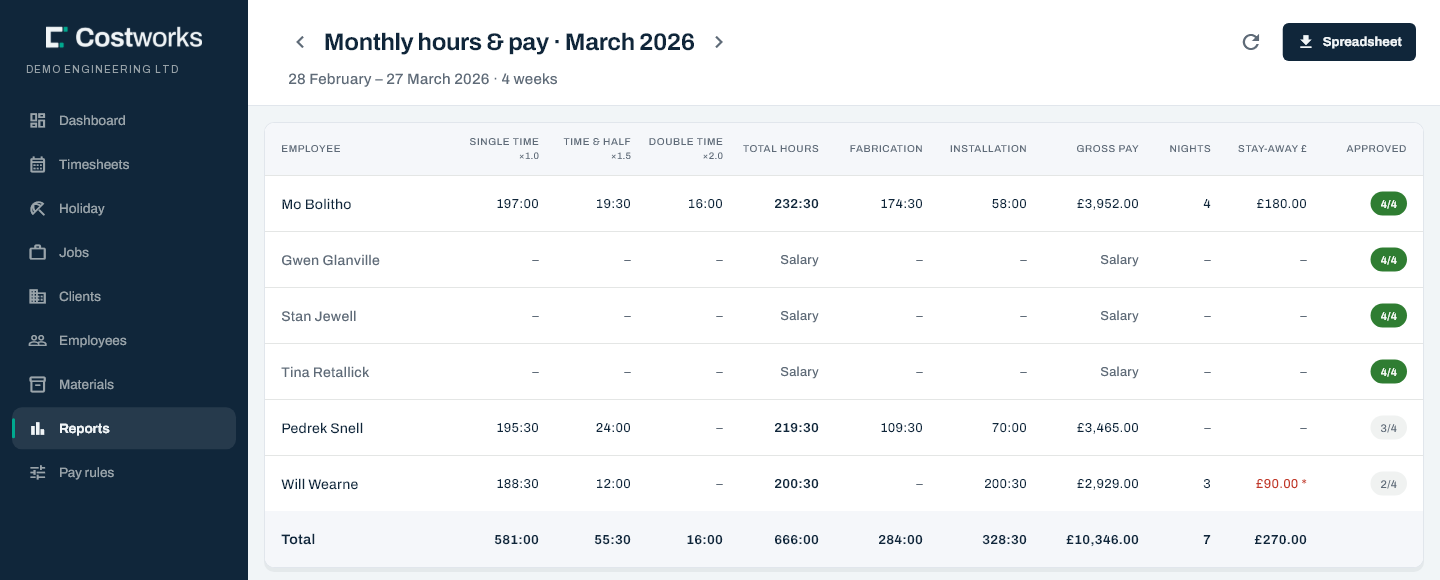
The payroll month isn’t the calendar month
It runs in whole weeks — the weeks that end in the month — so it reaches into the month either side. With weeks that run Saturday to Friday, August 2026 runs 1 to 28 August. The report says so on the screen every time.
What’s on it
- Every active person’s hours grouped by multiplier, with the multiplier printed under each heading, and the month total.
- Beside the total, the work split into Fabrication and Installation. Work recorded before the type of work was asked is “not recorded”, never guessed.
- Gross pay, including the stay-away pay, with NIGHTS and STAY-AWAY £ beside it in a month when somebody stayed away.
- How much is actually signed off. If three weeks are approved and one isn’t, the totals can still change, and the screen says so.
Somebody archived still appears for the weeks they worked. Subcontractors never appear. Somebody with no rate is flagged, with their money columns empty.
The spreadsheet
Spreadsheet downloads a CSV with a row per person: a column per multiplier, then the total, fabrication, installation and not-categorised hours, the rate, Gross pay, Unpriced hours, Stay-away nights, Stay-away pay and Unpriced stay-away nights, and Weeks approved beside Weeks in month.
- Hours come out as decimals, because a spreadsheet can’t add up 43:30.
- The decimal separator is always a full stop, and names are quoted, so a comma in one can’t shift the columns.
- Unpriced hours are hours on days with no pay rate on file yet, which the gross leaves out. It reads 0.00 when every day had a rate.
- A salaried person’s gross pay is empty; their stay-away pay is in Stay-away pay only.
Still stuck? Contact us — a real person, usually the same day.