
- Home
- Help centre
- For the crew
- Recording a day
For the crew
Recording a day’s hours
Open My week, tap the day, check the times, tap Save. Most days that’s the whole job.
Adding hours
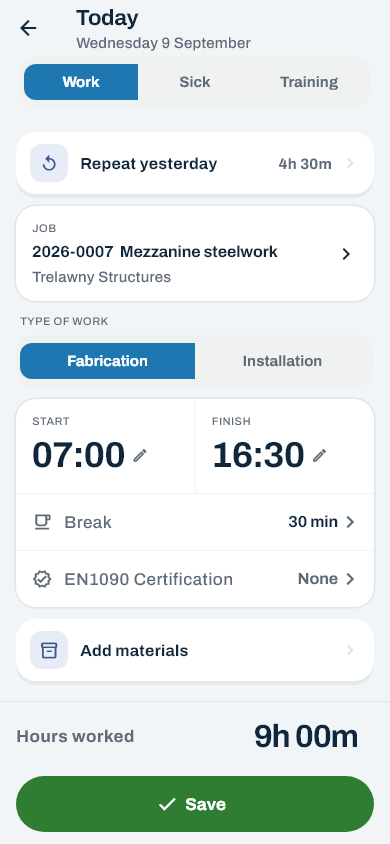
- On My week, tap an empty day — it says Add hours. The form is headed Today, Yesterday or Tomorrow when it’s one of those, Adding hours otherwise.
- Same as yesterday? Tap Repeat yesterday at the top. It fills in the job, the type of work, the times and the break in one go. Check it and save.
- Different job? Tap the job box. The jobs you’ve been on lately are at the top under Recently worked on.
- Pick Fabrication or Installation. Save won’t go through until you have. After the first day it carries over.
- Tap Start or Finish and turn the wheel. Times go in on the hour or the half hour.
- Tap the Break line and pick None, 30 min, 1 hour or 1h 30m. Anything else, use 30 min less and 30 min more, then tap Done.
- Check Hours worked. If it looks wrong, the times are wrong.
- Tap Save. You’re taken straight back to My week.
Finding the job
If the job isn’t in Recently worked on, search by job number, title or client. Type the number the way the job sheet writes it: 26 156 finds 2026-0156, and 26 Admin finds the admin job for the year.
Only open jobs are listed — a job that has been finished off can’t take new hours. A job marked On hold can still take hours, but check with the office before booking a day to it. If the job you want isn’t there at all, the office hasn’t put it on yet.
Sick or training
Tap Sick or Training along the top instead of Work. You don’t pick a job for those. Holiday isn’t put in here — you ask for it from the Holiday tab. See Asking for holiday.
The EN1090 record
Welded on this shift? Tap the EN1090 Certification line and fill in the wire number, the gas number and the plant, 1 to 5 — all three, or none — then tap Save record. The gas number is offered from the last one recorded, so change it if the bottle has.
Which days you can fill in
Hours go in for up to eight weeks back and two weeks ahead. For a day further back than that, ask the office. You need signal or wifi to save — if it says there’s no connection, nothing is lost: get to a signal and tap Save again.
Still stuck? Ring the office — there’s nothing in the app that somebody there can’t undo. Or contact us.